SwiftUI + Combine in Practice: Building a Football App
How the Cartola FC team introduced SwiftUI and Combine into the app during the 2021 season: motivations, obstacles with SwiftUI 1, the migration to SPM, a stable launch at 99% crash-free, and lessons learned.

Context
Hi everyone. I’m going to share a bit about the motivations, obstacles, losses and gains of bringing these new frameworks into a new feature that shipped in the 2021 season of Cartola FC.
It all started back in Q4 of 2020 at Cartola, when we had to add the famous and long-requested Reserve Bench (Banco de Reservas) for the upcoming season. So the engineering team (we were four iOS devs) got together to discuss using SwiftUI. At that point we were already using the Combine wrapper lib that supported older Apple operating systems (iOS 12), OpenCombine. We planned to use it minimally so we wouldn’t run into issues with something still in beta. The team’s strategy was that once we could fully adopt Combine, removing the lib would be as simple as dropping the Open prefix from the imports, leaving just Combine. A nice strategy that worked out. Everything worked.
When we were actually able to raise the support target to iOS 13, dropping iOS 12 support, the migration was pretty smooth. Which we can’t say about SwiftUI.
The obstacles of the migration
The first problem was with the frameworks that already existed. At Cartola we already used dynamic framework modules inside the project, both to separate code responsibilities and to improve the build process, which heavily affected CI. We had a big effort to take some project modules and turn them into SPM (Swift Package Manager).
Modules migrated to SPM
- UI
- Networking
- Models
- Logic
- Resources
- Protocol
- Analytics
- Navigation
I say “possible” ones because of the deadline we had and the complexity of other modules.
Since we would only put (as if that were little, but it wasn’t) the whole Lineup screen in SwiftUI, that alone was already a lot of change. Considering that screen was legacy, with Objective-C code, lots of functionality, and a new one still coming in - the Reserve Bench. A lot of responsibility.
How was the decision made?
Something a lot of business people ask me is: “what was the impact on the Product or the Customers?”.
From a Product standpoint, bringing in a newer technology opens opportunities for features that today’s more recent devices can take advantage of. It also improves the user experience, bringing more fluidity to interactions with the app. There’s the delivery-speed angle, which increases when developing new features with SwiftUI compared to View Code or Storyboard (don’t even mention the merge hells). That part is absurd.
Creating a screen is very fast. Prototyping with SwiftUI is a matter of a few minutes - see most of the videos out there on social media showing layout creation. It’s absurdly fast.
Another important point was that our iOS 12 user base was very small (really small) and it wouldn’t be worth leaving the large share of users - who were already on iOS 14, by the way - without this update. Still, the engineering team decided to support iOS 13 and we didn’t implement anything from SwiftUI 2, which would have been bad for our users, since a considerable portion was on iOS 13. But because of that we had some issues, since SwiftUI 1 lacks a lot of functionality that SwiftUI 2 fills in, bringing the need to mix or create some UI components (UIKit) with View Code (not Storyboard, please!).
The good side of being able to mix UIKit with SwiftUI is that not everything needs to be migrated to SwiftUI to actually be used - that is, if you’re in a refactoring process, you can still reuse a lot of UIKit components you already have in your app, or create a new one because SwiftUI 1 doesn’t have the support.
This point about SwiftUI versions is something important to consider when thinking about migrating. It’s important to keep in mind that the first version isn’t complete. But even so, the documentation is good. So when the developer hits a piece of code, Xcode itself says that functionality is for version 14+, or a read of the documentation already tells which SwiftUI version that functionality belongs to. This isn’t a blocker for implementation.
Knowledge of SwiftUI is another point at play. Being something new, many developers may not have studied or worked with it yet. We went through this in some interviews for our team. We saw that some developers had no experience with SwiftUI and hadn’t even studied it. But that wasn’t a blocker for us on the team. You just had to be willing to learn, and it was up to the team to upskill them. Globo sponsors employees with training and encourages this knowledge exchange with internal talks and technical committees, which help spread knowledge. So when someone joins the team, there’s a knowledge handoff to level up the new employee. That’s a differentiator for us to use cutting-edge technology. So much so that implementation started in the last quarter of 2020, given that SwiftUI launched in September 2019. Today there are several articles and Apple itself has some courses on SwiftUI and Combine.

Declarative, cross-platform and Combine
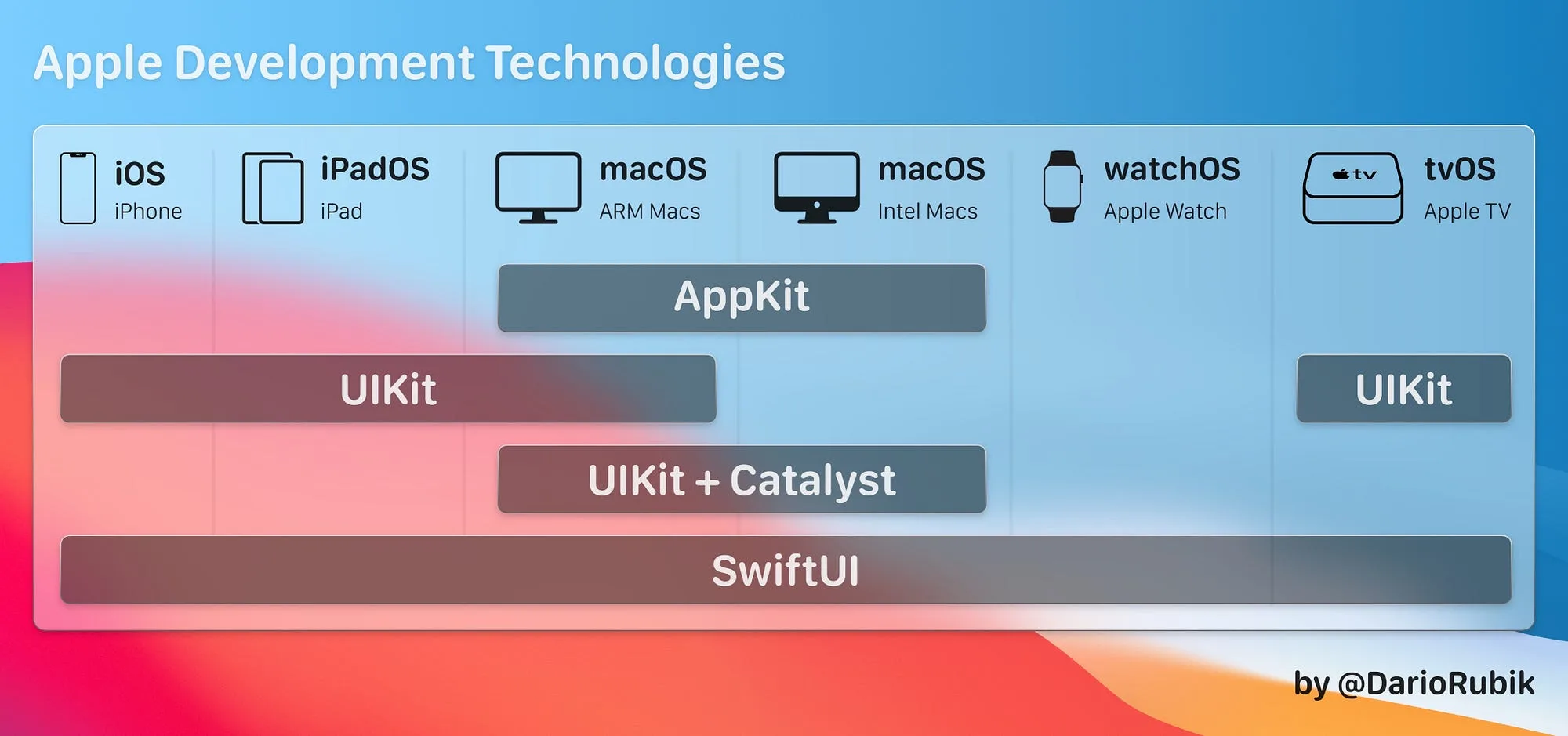
For the engineering team, writing with SwiftUI is better because it’s declarative instead of imperative, as we write with UIKit. Basically, it means you simply focus on describing how you want your user interface to look and behave, letting SwiftUI figure out the best way to do it.
Being cross-platform is another gain. Your UI can easily be shared to watchOS, macOS and tvOS.
Speaking of Combine… At first, when we still decided to use OpenCombine, we agreed on the team to use it only for View binds and not everywhere. Over the course of development, and once we actually adopted native Combine, we saw we could use it in other places like requests. Combine is also declarative, making it easier to write and understand when processing events and data asynchronously. Another gain from raising the iOS target.
Another downside is the Preview, because it can break in some cases and you’re left without that UI reference while building a screen. This may not happen. But it’s common when you have several dependencies and module imports. See the number of posts on Stack Overflow about preview crashes. This can slow down the development process a bit. But nothing a build on the simulator won’t solve, and for anyone used to only seeing layout this way (forget Storyboard, please!), maybe it isn’t a big problem.
Having said all that, we took these points to our business side. Our PO agreed with moving up to version 13 and, since all the points raised above were facts, the buy-in from both sides (business and development) was smooth.
Launch
We shipped the app with the Reserve Bench in April and immediately ran to analytics to track the app’s health at launch. Knowing that SwiftUI is something new - roughly 2 years old - we knew some bug could occur, but we had done every kind of test before launch. And what was the result? A crash-free users rate of 99% - that is, the version was stable. Even later, with the start of the Brazilian championship in May, when there’s really a bigger surge of users, the app proved to be stable.
Conclusion
Motivation
- Speed in creating layout.
- Migrate gradually. You don’t have to migrate everything from UIKit; it can be done incrementally.
- Being able to use new features available only for the most recent iOS versions.
- Increase delivery speed, since building layout is easier and faster.
- Use Apple’s cutting-edge technology, staying ahead in the market.
- The code being declarative.
- Writing less code to get the desired result.
- Cross-platform.
- You can use the preview to see the views as if it were a live reload. That helps you build your UI fast.
- WidgetKit requires SwiftUI and you might want to have one in your app.
Obstacles
- Migrating some modules that were previously in static frameworks to SPM.
- SwiftUI 1 isn’t complete, still needing UIKit if you want to support from iOS 13.
- Team knowledge.
- Problems will be harder to solve, since no one has faced them yet (though that’s shrinking over time).
- Best practices haven’t been defined yet.
Losses
- Your user base on devices with iOS 12 or earlier.
Final thoughts
SwiftUI is the future and it’s here to stay.
I don’t see UIKit going anywhere for a long time.
The future is declarative - see the number of languages adapting to be declarative. Take Android with Jetpack Compose.
But my advice is: understand the advantages and disadvantages and weigh them when thinking about writing a new app or building new features in a production app. If you’re building a small prototype or a demo app, SwiftUI might be the right choice and can help reduce development cost and time. If you’re building something for users on iOS 12 or earlier, maybe UIKit is preferable. But you can also choose which features you want to ship for each OS - that is, something only for iOS 13 users or for iOS 12. It’s an option.
If you’re struggling to decide between UIKit and SwiftUI, try using a combination: SwiftUI first, or a conservative UIKit project with some views/features in SwiftUI, like we did at Cartola.
The productivity gains outweighed the small setbacks I listed above.
Thanks for reading and have fun with SwiftUI!
Originally published on Medium
This article was originally published on July 19, 2021. This version on buildcomcarlos.com is the full editorial copy kept on my site. You can read the original on Medium with the original formatting, claps and replies.
Enjoyed the article?
Like it and leave a comment. It helps me decide what to write next.
Comments